Others
TCP port checking, who occupying
-
TCPView. TCPView for Windows – Sysinternals | Microsoft Learn
-
Powershell
-
netstat -ano | findstr 000
Change host/fqdn mapping on local machine
-
Modify file: `C:\Windows\System32\drivers\etc\hosts`
Find windows certificate
cd cert:
PS Cert:\> ls
  Location   : CurrentUser
  StoreNames : {TrustedPublisher, ClientAuthIssuer, Root, TrustedDevices...}
  Location   : LocalMachine
  StoreNames : {TestSignRoot, ClientAuthIssuer, OemEsim, WindowsServerUpdateServices...}

PS Cert:\> cd .\\LocalMachine\
PS Cert:\LocalMachine\> ls

PS Cert:\LocalMachine\> cd .\Root\
Remote desktop auto reconnect session (not working for remote desktop connection manager(sysinternal))
-
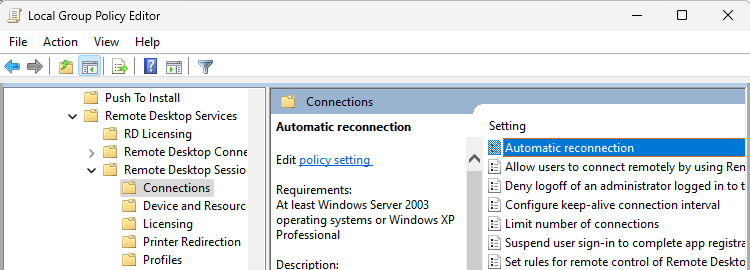
setting on “Local Computer Policy > Computer Configuration > Administrative Templates > Windows Components > Remote Desktop Services > Remote Desktop Session Host > Connections > Automatic reconnection”
Desktop icon margins
-
default to -1128, bigger for wider
[HKEY_CURRENT_USER\Control Panel\Desktop\WindowMetrics]
"IconSpacing"="-1128"
"IconVerticalSpacing"="-1128"
Disable touch screen
-
Disable: Device Manager > HID > “HID Compliant Touchscree” and “Intel(R) Precise Touch Device”
gMSA account
-
What to fill in for the account/password for gMSA account?
-
leave them empty then apply/ok.
IE7
-
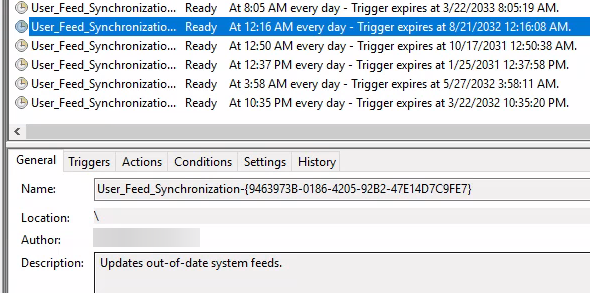
Keep accessing to AD credential, ask you to login and renew AD account/password
-
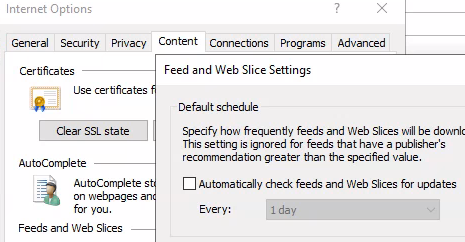
Solution: Go to IE7 -> “Internet options” -> “Content” -> “Settings” of “Feeds and Web Slice” -> Uncheck “Automatically check…” of “Default schedule”
Event Viewer
-
Event ID
-
12: Kernel-General – system start
-
13: Kernel-General – system shutdown
-
41: uncompleted shutdown,
e.g. “The system has rebooted without cleanly shutting down first. This error could be caused if the system stopped responding, crashed, or lost power unexpectedly.”
-
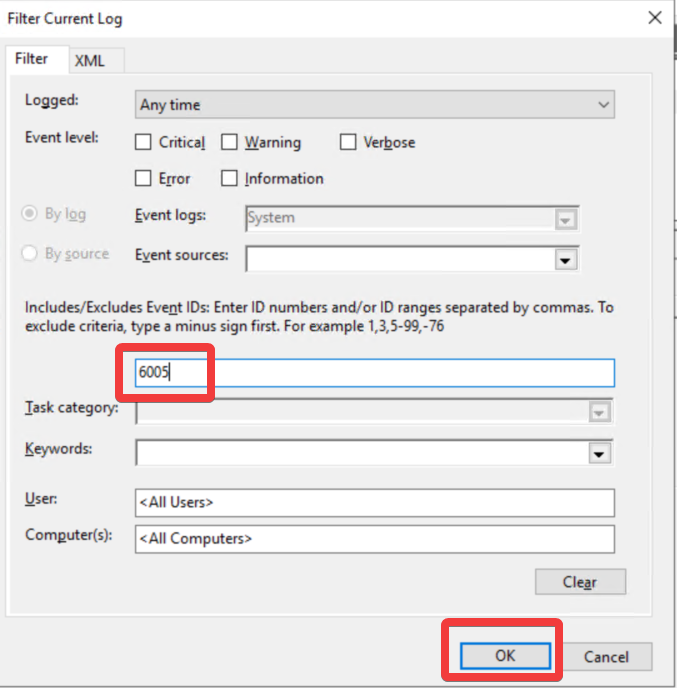
6005: Event Viewer start,
e.g. “The Event log service was started.”
-
6006: shutdown correctly,
e.g. “The Event log service was stopped.”
-
6008: shutdown abnormally,
e.g. “The previous system shutdown at 0:00:00 AM on 1/1/2022 was unexpected.”
-
107: The system has resumed from sleep.
-
1074: user forced shutdown/restart log,
e.g. “The process XXX.exe (XXX) has initiated the restart of computer XXX on behalf of user NT AUTHORITY\SYSTEM for the following reason: XXX Reason Code: 0x00000000”
-
1076: user forced shutdown/restart log/reason,
e.g. “The reason supplied by user XXX for the last unexpected shutdown of this computer is: Other (Unplanned) Reason Code: 0xa000000 Problem ID: Bugcheck String: Comment:”
Add TrustedInstaller
-
Checkname: “NT Service\TrustedInstaller”
Language pack can’t download
-
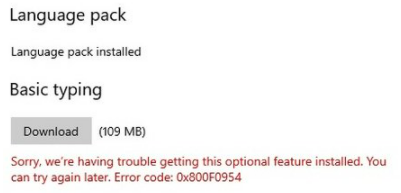
Error: Download pack with error 0x800F0954
-
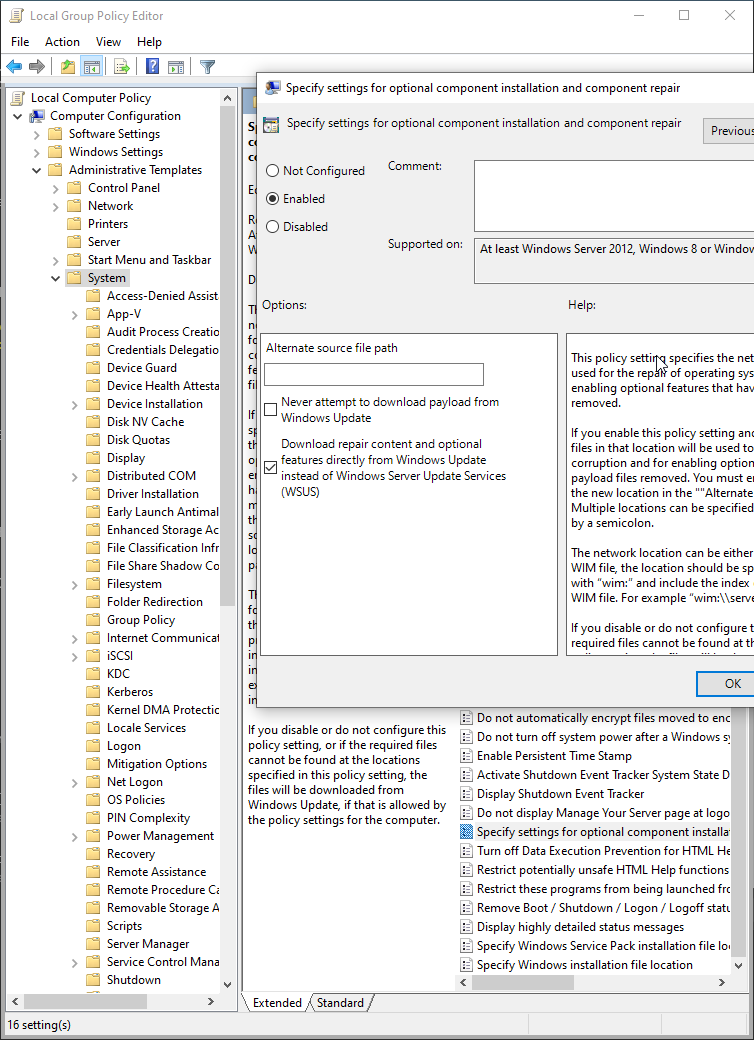
Ans: Computer Policy -> Computer Configuration -> Administrative Templates -> System -> “Specify settings for optional…” (enable and check “Download repair..”)
C:\Program Files (x86)\Microsoft Visual Studio\2017\Enterprise\MSBuild\Microsoft\NuGet\15.0\Microsoft.NuGet.targets(186,5): error : The package xxx with version 6.0.1304 could not be found in C:\WINDOWS\system32\config\systemprofile\.nuget\packages\. Run a NuGet package restore to download the package. [xxx.csproj]
-
Change Jenkins slave executor from SYSTEM to other account.
IE: your current security settings don’t allow this file to be downloaded
-
Add current site to Trusted sites (IE -> Tools -> Internet Options ->Trusted sites -> Sites -> Add)
-
IE -> Tools -> Internet Options -> Internet -> Custom level… -> Downloads -> File download -> Select Enable
Fail to use section “<handlers>” of web.config
-
Error: HTTP Error 500.19 – Internal Server Error
This configuration section cannot be used at this path. This happens when the section is locked at a parent level. Locking is either by default (overrideModeDefault=”Deny”), or set explicitly by a location tag with overrideMode=”Deny” or the legacy allowOverride=”false”.
-
Solution:
-
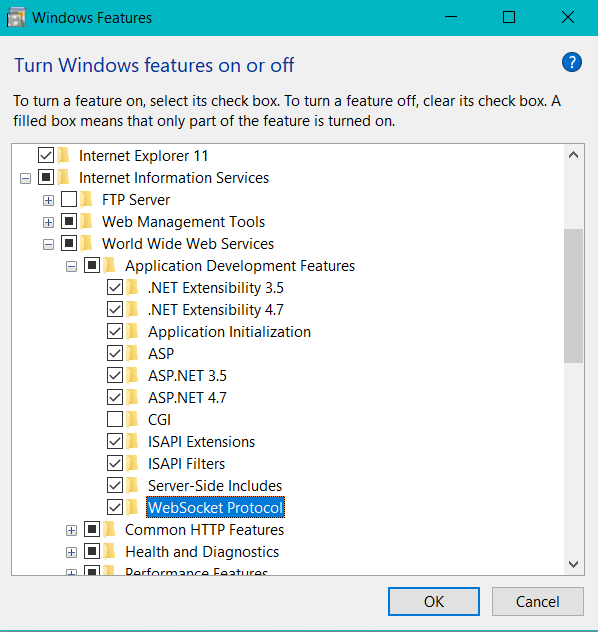
Settings search : “Turn windows features on or off“
-
Enable all except “CGI” under “Internet Information Services > World Wide Web Services > Application Development Features“
Fail to load user profile while loginning
-
error: “User profile cannot be loaded”
-
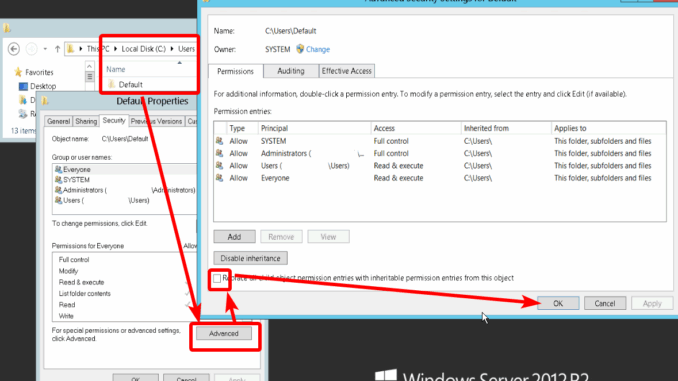
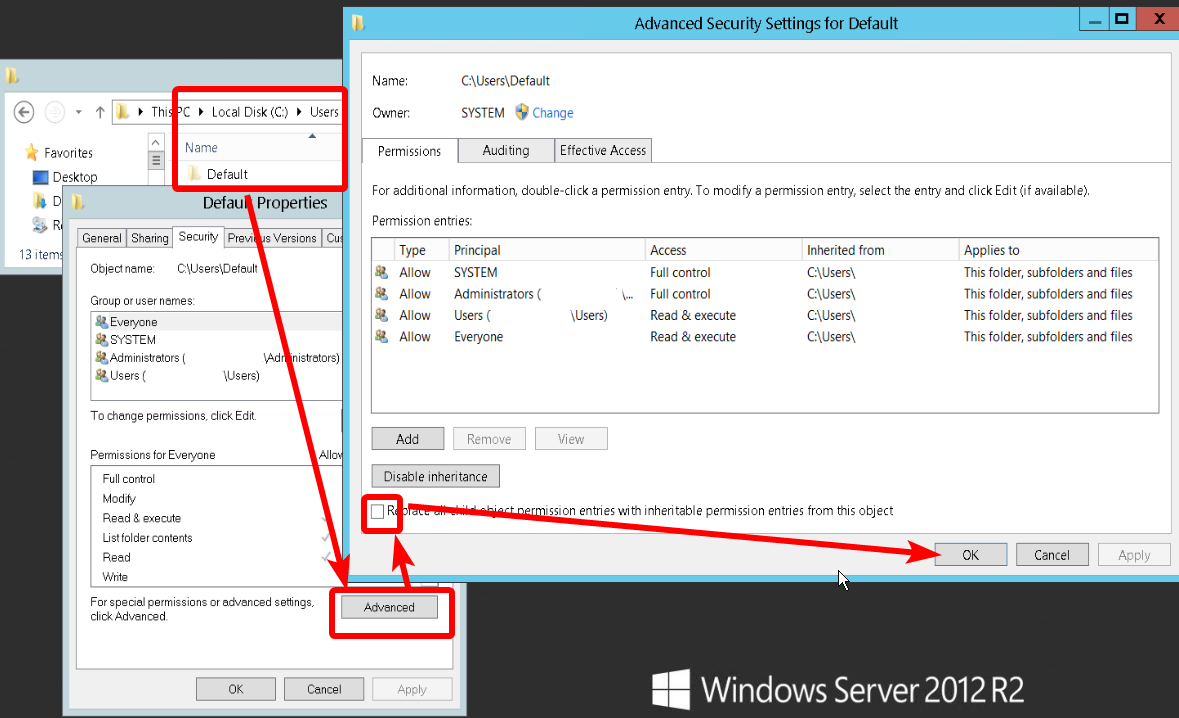
Go to `C:\Users\Default\` > right click folder”Default” > “properties” > tab to “Security” > Click “Advanced” > Check “Replace all child permissions..” and apply.
Add program exe to windows start-up
-
Win+R > Enter `shell:startup` .
-
Create program shortcut to the folder.
Can’t change domain, no access
-
Ask IT admin for applying the permission to your AD account.
-
Before the server object add to AD server, got to keep the computer open and online (Or it’ll need to re-add by IT Admin)
[SourceTree] Keep asking for trusting specific host
-
error message:
git -c diff.mnemonicprefix=false -c core.quotepath=false fetch origin
The server's host key is not cached in the registry. You
have no guarantee that the server is the computer you
think it is.
The server's rsa2 key fingerprint is:
ssh-rsa 2048 aa:d1:aa:00:bb:c0:b0:a0:d0:e0:f0:a0:a1:00:11:ee
If you trust this host, enter "y" to add the key to
PuTTY's cache and carry on connecting.
If you want to carry on connecting just once, without
adding the key to the cache, enter "n".
If you do not trust this host, press Return to abandon the
connection.
-
Solve:
C:\Users\{user}\AppData\Local\SourceTreebeta\app-3.2.0-beta-3360\tools\putty\plink.exe {git_server_uri}
Win11
(Obsoleted) Change taskbar to top
-
regedit.exe
-
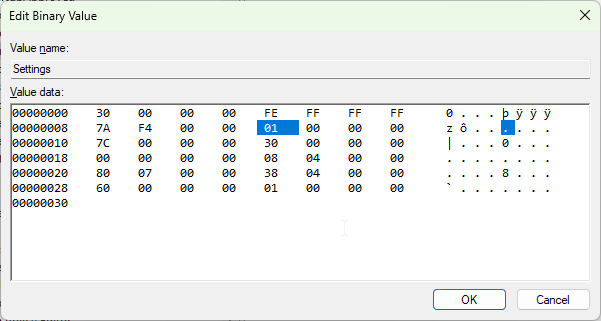
HKEY_CURRENT_USER\Software\Microsoft\Windows\CurrentVersion\Explorer\StuckRects3\Settings
-
top: 01, right: 02, left: 00, bottom: 03
CPU high For MS indexer
-
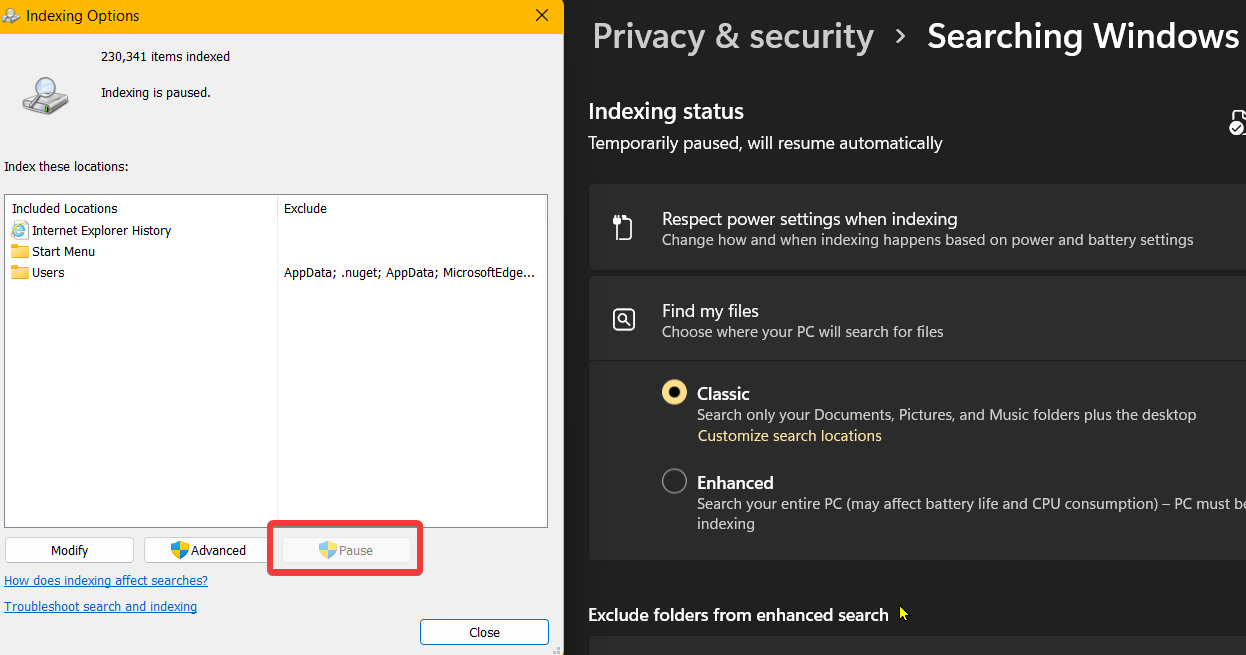
Q: always CPU 15~20%
-
A: Disable it if you’re not using file searching
Win10
Extend monitor to chromecast
-
Install driver: https://www.amyuni.com/downloads/usbmmidd_v2.zip
-
Run bat or command manually
-
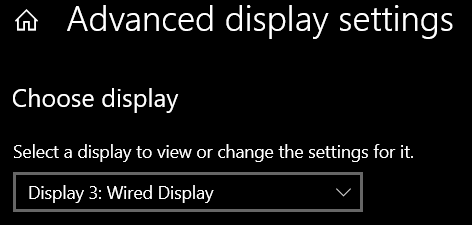
Now you have one new display connected within same network
-
Open chrome to cast with the new (extend)screen.
-
Ref: https://superuser.com/a/1621747 -> BelegNeurion solution
IIS
File encryption, plain text (e.g. connectionStrings of web.config)
# Must RUN AS ADMIN
#encrypt
C:\windows\Microsoft.NET\Framework64\v4.0.30319\ASPNET_REGIIS -pef "connectionStrings" "c:\folder"
#decrypt
C:\windows\Microsoft.NET\Framework64\v4.0.30319\ASPNET_REGIIS -pdf "connectionStrings" "c:\folder"
IIS Authentication
-
IIS

-
IIS config file location:
C:\Windows\System32\inetsrv\config\applicationHost.config
-
add
<location path="YourPath">
    <system.webServer>
        <security>
            <authentication>
                <anonymousAuthentication enabled="true" />
                <windowsAuthentication enabled="false" />
                <!-- 其他身份驗證方式的設定 -->
            </authentication>
        </security>
    </system.webServer>
</location>-
Web.config
<location path="YourPath">
  <system.web>
    <authorization>
      <allow users="?" />
    </authorization>
  </system.web>
</location>
Apps
choco install package by NuGet source
choco install dotnet4.7.2 --source https://chocolatey.org/api/v2
Jenkins exec managed script fail
-
Error msg:
10:55:58 FATAL: Caught exception while loading script ‘Docker build (win/linux)’
10:55:58 java.lang.InterruptedException
-
Solve: Re-run again
Leave a Reply