Other
-
Prebuild event in Visual Studio replacing $(SolutionDir) with *Undefined*
-
Msg:
-
when using
  <Project>
  ...
    <Target Name="AfterBuild">
      <Copy SourceFiles="$(SolutionDir)..\Lib\*.dll" DestinationFolder="$(OutDir)Debug\bin" SkipUnchangedFiles="false" />
      <Copy SourceFiles="$(SolutionDir)..\Lib\*.dll" DestinationFolder="$(OutDir)Release\bin" SkipUnchangedFiles="false" />
    </Target>
  </Project>
-
Get error
18:17:09 D:\CI_FOLDER\SYSTEM\Jenkins\workspace\XXX_Daily_Build\Src\XXX\XXX.csproj(273,5): error MSB3030: Could not copy the file "*Undefined*..\Lib\x86\YYY.dll" because it was not found.
-
Ans: replacing all $(SolutionDir) with $(ProjectDir)..\.
-
IIS – HTTP Error 404.3-Not Found in IIS 7.5 ()
-
Msg: The page you are requesting cannot be served because of the extension configuration. If the page is script, add a handler. If the file should be downloaded, add a MIME map.
-
Ans:
Control Panel -> Programs and Features -> Turn Windows features on or off
Internet Information Services -> World Wide Web Services -> Application Development Features
>>
Check all ASP.NET (.NET Extensibility, ISAPI Extensions, ISAPI Filters will be selected automatically).
-
VS – Trace back code (find last step on break point)
-
After version Visual Studio Enterprise 2017 version 15.5 Preview.
-
Enable : Tools, Options, IntelliTrace settings, and select the option “IntelliTrace events and snapshots.”
-
Get trace back on Stack Frame

.NET.Framework
-
Upgrade NET error
-
Msg: Your project does not reference ".NETFramework,Version=v4.7.2" framework. Add a reference to ".NETFramework,Version=v4.7.2" in the "TargetFrameworks" property of your project file and then re-run NuGet restore
-
Ans: Delete "obj" folder and rebuild.
-
FileLoadException when using MailKit/MimeKit
-
Error: MimeKit The located assembly's manifest definition does not match the assembly reference
-
Ans: Update Nuget MimeKit to the same to all project.
-
Can not delete \bin\roslyn\VBCSCompiler.exe – Access is denied
-
Task manager -> stop all "VBCSCompiler.exe"
-
Config file ScFilesToTransform does not define a value for metadata "Link".
-
ErrorMsg:
Error The item "config\xxx.config" in item list "ScFilesToTransform" does not define a value for metadata "Link". In order to use this metadata, either qualify it by specifying %(ScFilesToTransform.Link), or ensure that all items in this list define a value for this metadata. YYY.Project
-
Solve: Change "config\xxx.config" to "Copy if newer"
-
Couldn't load EnterpriseLibrary.Logging
-
ErrorMsg:
loggingConfiguration: Could not load file or assembly 'Microsoft.Practices.EnterpriseLibrary.Logging
-
Solve: Version and PublicKeyToken should be the same
Version=x.x.x.x, Culture=neutral, PublicKeyToken=yyyyyyyyy
-
IIS rewrite module – remove sub-folder issue
# No prefix "/"

<rule name="All SubPath Rewrite to Root" stopProcessing="true">
  <match url="^subfolder/(.*)" />
  <action type="Rewrite" url="/{R:1}" />
</rule>

# Not work
  <match url="^/subfolder/(.*)" />
HTTP Error 500.30 – ANCM In-Process Start Failure
-
Issue: If the target machine you are deploying to doesn't have ANCMV2, you can't use IIS InProcess hosting.
-
Solve (ch
.NET.Core
-
Enable debugging on IIS (Detailed error message)
<system.webServer>
   <httpErrors errorMode="Detailed" />
   <asp scriptErrorSentToBrowser="true"/>
</system.webServer>
HTTP Error 500.30 – ANCM In-Process Start Failure
-
Issue: If the target machine you are deploying to doesn't have ANCMV2, you can't use IIS InProcess hosting.
-
Solve (choose one):
-
Install bundle which has ASPNETCoreModuleV2.
-
Modify .csproj file.
  <PropertyGroup>
    <TargetFramework>netcoreapp2.2</TargetFramework>
--  <AspNetCoreHostingModel>InProcess</AspNetCoreHostingModel>
++  <AspNetCoreHostingModel>OutOfProcess</AspNetCoreHostingModel>
++  <AspNetCoreModuleName>AspNetCoreModule</AspNetCoreModuleName>
  </PropertyGroup>
-
HTTP Error 500.30 – ANCM In-Process Start Failure
-
Issue: can't read db connection string of appsettings.json when initializing NetCore .
-
Solve: fix the format and make it do reading appsettings.json correctly.
-
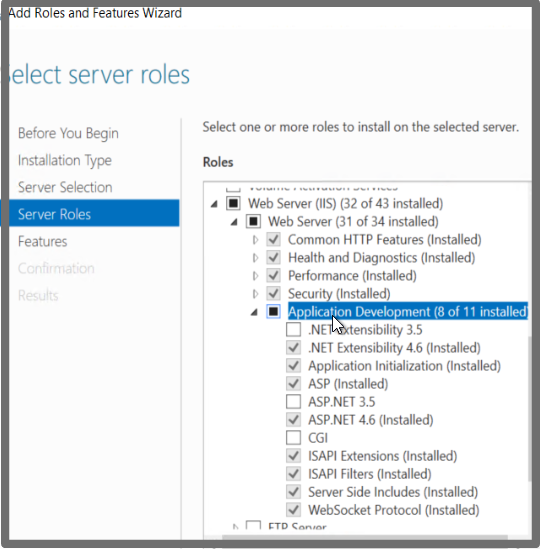
500.19 "handlers" This configuration section cannot be used at this path
-
Issue: can't read <handlers> section at web.config
-
Solve:
-
Install windows feature "Application Development Features" in World Wide Web Services(IIS)
-
HTTP error 500.30 – ANCM in-process start failure
-
ANCM == AspNetCoreModule
-
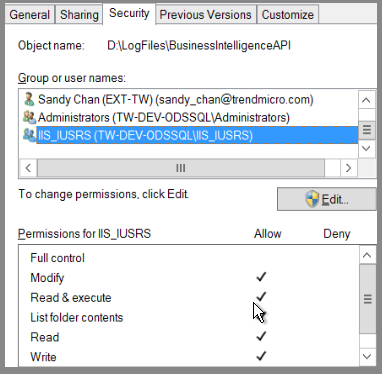
Issue: Logging to specific log folder permission denied
-
Solve:
-
Get issue detail by opening stdoutLogEnabled="true" in web.config.
-
Set log folder permission "Read/Write/Modify" to local user "IIS_IUSRS".
-
Json config with strong type
在 Startup.ConfigureServices 透過 services.Configure<T>()以強型別對應 IConfiguration 實例的方式,加入至 DI 容器:
Startup.cs
|
1
2
3
4
5
6
7
8
9
10
11
12
13
14
15
16
17
18
|
// …
public class Startup
{
private IConfiguration _config;
public Startup(IConfiguration config)
{
_config = config;
}
public void ConfigureServices(IServiceCollection services)
{
// …
services.Configure<Settings>(_config);
}
// …
}
|
使用的 DI 型別改成 IOptions<T>,如下:
Controllers\HomeController.cs
|
1
2
3
4
5
6
7
8
9
10
11
12
13
14
15
16
17
18
19
20
21
22
23
24
25
26
27
28
29
|
using Microsoft.AspNetCore.Mvc;
using Microsoft.Extensions.Configuration;
using Microsoft.Extensions.Options;
namespace MyWebsite.Controllers
{
public class HomeController : Controller
{
private readonly Settings _settings;
public HomeController(IOptions<Settings> settings)
{
_settings = settings.Value;
}
public string Index()
{
var defaultCulture = _settings.SupportedCultures[1];
var subProperty1 = _settings.CustomObject.Property.SubProperty1;
var subProperty2 = _settings.CustomObject.Property.SubProperty2;
var subProperty3 = _settings.CustomObject.Property.SubProperty3;
return $"defaultCulture({defaultCulture.GetType()}): {defaultCulture}\r\n"
+ $"subProperty1({subProperty1.GetType()}): {subProperty1}\r\n"
+ $"subProperty2({subProperty2.GetType()}): {subProperty2}\r\n"
+ $"subProperty3({subProperty3.GetType()}): {subProperty3}\r\n";
}
}
}
|
輸出結果如下:
|
1
2
3
4
|
defaultCulture(System.String): zh-TW
subProperty1(System.Int32): 1
subProperty2(System.Boolean): True
subProperty3(System.String): This is sub property.
|
這樣就可以是強型別,且有明確的型態。
-
Got 502.3 error when upgrading .Net.Core version
-
Error message:
An assembly specified in the application dependencies manifest (CloudKeyPool.deps.json) was not found:
package: 'Microsoft.ApplicationInsights.AspNetCore', version: '2.1.1'
path: 'lib/netstandard1.6/Microsoft.ApplicationInsights.AspNetCore.dll'
This assembly was expected to be in the local runtime store as the application was published using the following target manifest files: aspnetcore-store-2.0.0-linux-x64.xml;aspnetcore-store-2.0.0-osx-x64.xml;aspnetcore-store-2.0.0-win7-x64.xml;aspnetcore-store-2.0.0-win7-x86.xml
-
Solution: Add the follows into .csproj file.
<PropertyGroup>
<PublishWithAspNetCoreTargetManifest>false</PublishWithAspNetCoreTargetManifest>
</PropertyGroup>
-
Enable IIS Debug log
編輯 web.config 檔案。 將 stdoutLogEnabled 設定為 true,並將 stdoutLogFile 路徑變更為指向 [logs] 資料夾 (例如 .\logs\stdout)。 路徑中的 stdout 是記錄檔名稱前置詞。 建立記錄檔時,系統會自動新增時間戳記、處理序識別碼及副檔名。 使用 stdout 作為檔案名稱前置詞時,一般記錄檔會命名為stdout_20180205184032_5412.log。
-
Error NETSDK1004 Assets file 'D:\{solutionPath}\obj\project.assets.json' not found. Run a NuGet package restore to generate this file.
-
Tools > NuGet Package Manager > Package Manager Console and run:
dotnet restore
-
How to debug with local NuGet packages
-
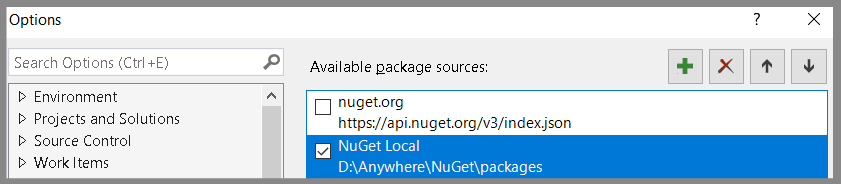
Put *.nupkg at specific folder, and add this folder into Tools -> Options -> Add a new NuGet source.
-
Make the new source checked ONLY (avoid other confusing packages)
-
Refresh NuGet list.
-
Change Nuget feed/source position
C:\Users\{{UserName}}\AppData\Roaming\NuGet\NuGet.Config

=== NuGet.Config ===
<?xml version="1.0" encoding="utf-8"?>
<configuration>
  <packageSources>
    <add key="nuget.org" value="https://api.nuget.org/v3/index.json" protocolVersion="3" />
    <add key="{{new-source}}" value="{{serverLink}}" />
  </packageSources>
</configuration>
-
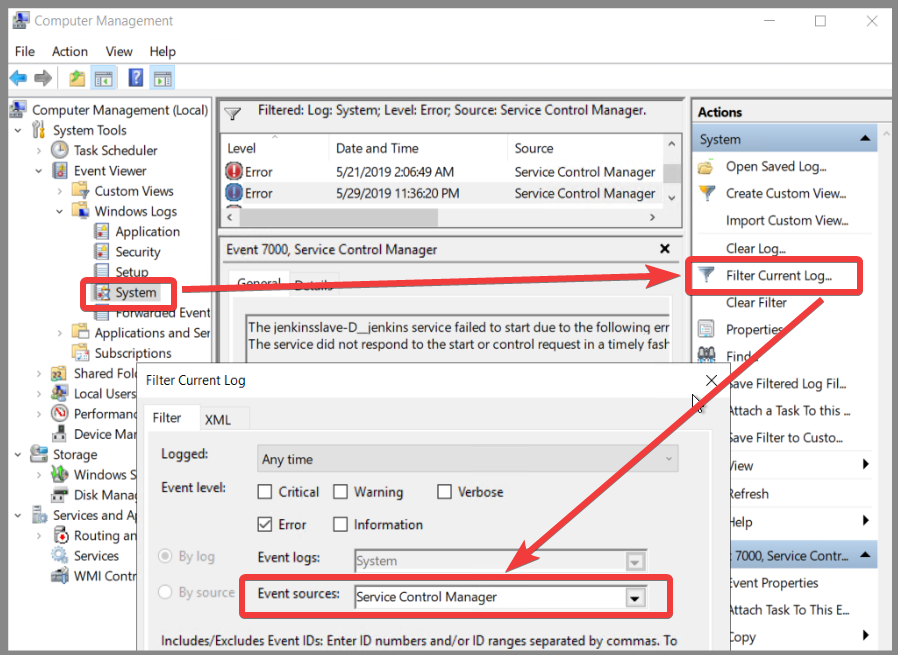
Check the log of windows service
-
"Computer Management" -> "Event Viewer" -> "Windows Logs" -> "System" -> filter by "Service Control Manager"
#Net #Net.Core #IIS #Visual stodio #VS
Leave a Reply